

The Java era, pocket sized again
What Is J2ME Loader?
J2ME Loader is an Android app that runs Java ME software, the games and utilities written for the keypad phones of the 2000s. Those programs ship as JAR files, sometimes with a small JAD companion, and modern Android cannot open them on its own. This emulator rebuilds the old Java runtime inside an Android app, so a game written for a Nokia, Sony Ericsson or Motorola handset starts, draws and plays on a touchscreen phone today.
The app is developed by Play Software, the project led by Nikita Shakarun, and it has grown into the reference way to play these games on Android: more than five million installs, a 4.26 star store rating from over 28,000 players, and a library view that treats your JAR collection like the shelf it is. This site is the download home for the APK file, with the file details checked, an honest review and setup help written from real play sessions.
There are no games bundled inside, and that is the right design. You bring the JAR files you kept, copied or preserved, and the loader does the rest: a virtual keyboard for keypad input, settings saved per game, and scaling that stretches a 240x320 classic across a modern display without turning it into soup.
Inside the loader
J2ME Loader Features
Every feature below is in the current build and was checked during our own sessions, with a test library of platformers, racers, puzzle games and one stubborn strategy title that defeats lesser emulators.
Runs JAR and JAD files
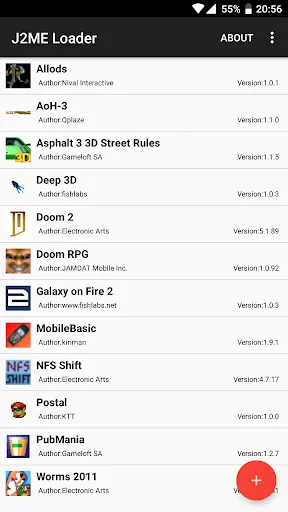
Point the loader at a JAR file and it installs the game into your library, reading the JAD descriptor when one travels with it. Your collection sits in one list, ready to launch.
Most 2D games, plus 3D
The loader supports most 2D Java games and a range of 3D titles with some limitations, which covers the great bulk of what people kept from the era.
Virtual keyboard
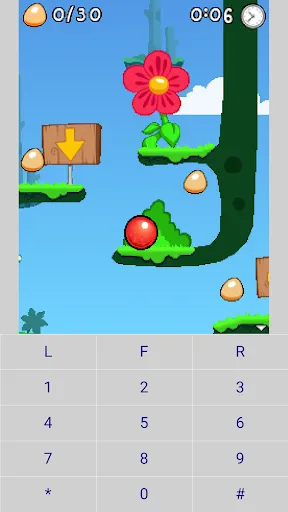
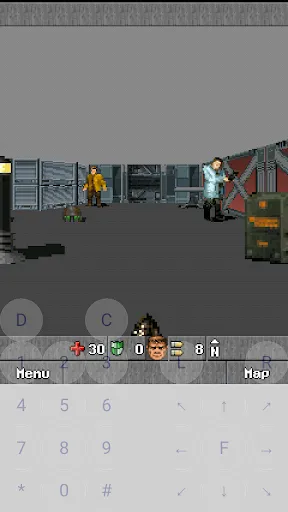
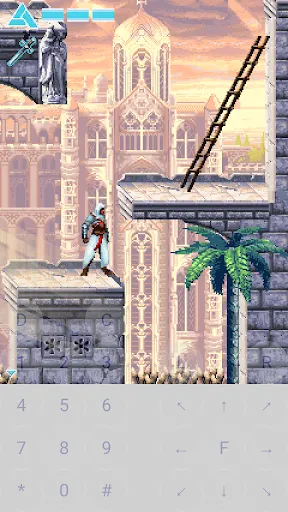
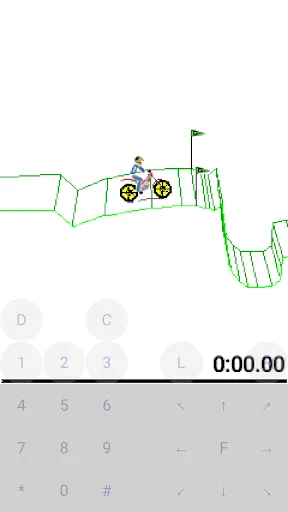
An on-screen keypad recreates the buttons the games expect: number keys, star, hash, softkeys and a D-pad, positioned over the game and adjustable while you play.
Per game settings
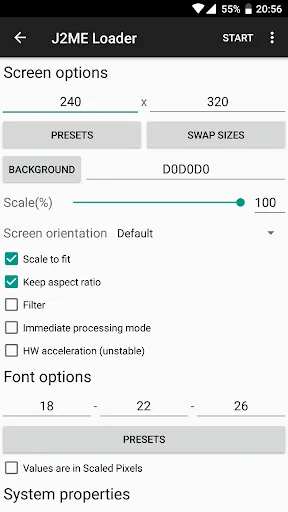
Each title keeps its own profile. Screen size, key layout and other options are saved per application, so the racer and the chess game never fight over one setup.
Scaling support
Old games were drawn for tiny screens. Scaling options stretch them to fill a modern display, keep the original aspect, or run at exact size for pixel sharp purists.
Tiny and free
The whole app is 6.29 MB, free, and carries no ads. On a modern phone it is smaller than a single photo, which feels right for software from the kilobyte era.
Works on old Android too
The loader runs on Android 4.0 and up, so a drawer phone from years ago can become a dedicated Java games machine.
Open development
The project is open source under the Apache 2.0 license, with its code public and its translations contributed by the community of players who use it.
Plenty of emulators run one famous game well. This one earns its place by running a whole library politely, each title with its own settings, on almost any Android phone you own.
From the app itself
J2ME Loader Screenshots
Every frame below is a real screenshot from the app listing: the library, a game in play, the virtual keyboard laid over the action, per game settings and the add a game flow. No renders and no mock-ups.
The current build
What Feels New in J2ME Loader
The current build keeps the focus where players feel it: compatibility and stability. Bug fixes headline the recent changes, the unglamorous work that decides whether a beloved game boots or sulks at a black screen. The library handling is steadier with large collections, and per game profiles make returning to a title feel like picking up the same old handset, keys exactly where your thumbs left them.
If you last tried a Java emulator years ago, the honest summary is that the rough edges moved. Games that once needed fiddling now tend to start, scale and save like they mean it.
Start playing in minutes
How to Install J2ME Loader on Android
The install follows the familiar pattern for a direct APK download, and the game setup after it takes one extra minute.
- Fetch the file. Use the download button on this page and let the full file arrive; a partial download is the one cause of most failed installs.
- Allow the install. When Android asks, permit installs from your browser just for this file, then open the download and confirm.
- Open the app. You will see an empty library, which is correct: the app is a player, not a games bundle.
- Add your first game. Tap the add button, pick a JAR file from your storage, and the game installs into the library with its own icon.
- Launch and set your keys. Open the game, call up the virtual keyboard, and arrange the keypad where your thumbs want it before the first level starts.
From there, play. Your settings for that game are saved, so the second launch is pure nostalgia with no setup tax.
Keys your thumbs remember
The Virtual Keyboard and Controls
Java games were built for physical keys, and the virtual keyboard is how this player honours that. The overlay gives you the full keypad: digits that double as directions in many games, star and hash for special moves, two softkeys for menus, and a D-pad for titles that map movement there. Buttons can be moved and resized, because a fighting game and a chess game want very different layouts.
Our advice from the test rack: set the layout once per game, generously sized, then save it in that game profile. Muscle memory returns faster than you expect, and within a session your thumbs stop looking for keys that are not there.
Big screen, small classics
Scaling and Per Game Profiles
A 176x208 game on a modern 1080p screen is a postage stamp without help. Scaling support stretches the picture sensibly, and the orientation and screen size options let each game declare how it wants to be seen. Racers often want landscape and full width; vertical puzzlers want the original aspect with the keypad parked below.
Profiles are the quiet hero feature. Every application keeps individual settings, so changing one game never breaks another. On our test shelf, that is the difference between an emulator you tolerate and one you actually live with.
Checked before it lands here
Safety and Verification
The file offered on this site is checked before it is listed: package name confirmed as ru.playsoftware.j2meloader, file size matched at 6.29 MB, permissions reviewed, and the build installed and played on our test phones with a real JAR library. If a build fails any check, it does not go up.
The app itself asks for little: access to the files you choose to load, and that is close to the whole arrangement. It is free, carries no ads, and its optional in-app purchases are donations toward development, which is about as honest as app economics get.
Under the hood
Technical Details
The app implements the Java ME environment, the MIDP and CLDC world those MIDlet games were written against, and translates it onto the Android runtime. Games run as the MIDlets they are, with their own save data kept per title, the way the original handsets kept it.
Practically, that means small files and light demands: a 6.29 MB app, Android 4.0 and up, and performance that even modest phones handle easily, because the games themselves were designed for processors from another century.
Earlier builds
Old Versions
We serve the current build, and for almost everyone that is the right choice: it carries the widest game compatibility and the latest fixes. Earlier builds occasionally suit a very old phone or a specific game that behaved differently in the past, and if that is your situation, write to us and we will help you work out which build your device will be happiest with.
Whichever build you run, your game library and saves are yours: the JAR files live in your storage, exactly where you left them.
Other ways to play
J2ME Loader Alternatives
Honest context helps a decision. Desktop Java emulators run these games on a PC with a big screen and a real keyboard, at the price of leaving your pocket. Other Android loaders exist in the same family tree, some forked from this very project, each with its own compatibility quirks and update rhythm.
This remains the one we reach for on Android: the original project, the broad compatibility, the per game profiles, and a store record built over years. If your games live on your phone, that combination is usually the comfortable one.
When a game sulks
Troubleshooting
Most problems have plain causes. A game that will not install is often a damaged JAR or a file that is not really a Java game at all; fetch a clean copy and try again. A black screen at launch usually means the title wants a different screen size, so open its profile and try another resolution before blaming the game.
Keys that feel wrong are a layout problem, not a compatibility one: enlarge the buttons, move the D-pad, and save. Sound that stutters on an old phone improves when heavy apps running alongside are closed. Our fixes guide works through the full list in order, symptom by symptom.
Staying current
How to Update J2ME Loader
Updating is a small ritual. Download the new file from this site, open it, and install it over your existing copy. Your library list, per game settings and save data carry across, because they describe your games, not the app package.
After an update, launch one demanding game first as a smoke test. If it plays, everything else on your shelf will too.